
Ergonomic Home Office Setup Tips: Boost Comfort & Productivity
Are you tired of ending your workday with a sore back, aching shoulders, and tired eyes? It might be time to rethink your home office setup.
Imagine a workspace that not only boosts your productivity but also safeguards your health and well-being. By making a few simple changes, you can create an environment that feels comfortable and supports your body. You’ll discover practical ergonomic tips tailored just for your home office.
These insights will transform the way you work, helping you stay focused and energized throughout the day. Ready to revolutionize your workspace? Let’s dive in and explore how you can make your home office the perfect place to excel.
Choosing The Right Furniture
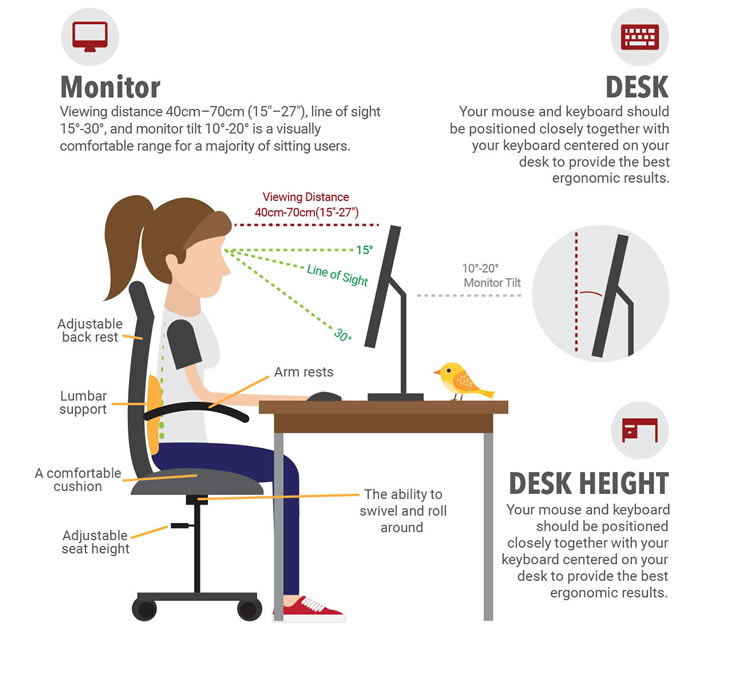
Chairs should be comfortable and supportive. A good chair has a high back. It also has adjustable armrests. You need a chair that supports your spine. This helps to reduce back pain. A swivel chair can help you move easily. Your chair should be at a proper height. Feet must rest flat on the floor.
Desks must be adjustable. You can change the height of an adjustable desk. This helps you work standing or sitting. It keeps your posture healthy. Adjustable desks improve comfort. They can help reduce strain on your neck. A desk with a large surface is ideal. You need enough space for a computer and papers.
Footrests are important for comfort. They help you keep feet elevated. Elevation reduces pressure on your legs. Footrests should be sturdy. They should not slide around. Proper footrests help with blood circulation. They can reduce fatigue. Choose a footrest that is adjustable. It should match your chair’s height.
Optimizing Monitor Placement
Keep your monitor at eye level. This helps your neck stay straight. Place it about an arm’s length away. You should not look up or down. This keeps your eyes and neck comfortable.
Move your screen away from windows. This helps to reduce glare. Use curtains or blinds if needed. Adjust the monitor brightness too. It should match the room’s light. This protects your eyes from strain.
Keyboard And Mouse Setup
Keep your wrists straight and relaxed. Your hands should float above the keyboard. Avoid bending your wrists up or down. This helps prevent strain. Place a soft pad under your wrists. This adds support and comfort. It’s best to keep your elbows close to your body. Keep your keyboard at elbow height. This helps keep your arms in a natural position.
Use a mouse that fits your hand size. A small mouse may cause tension. A large mouse can be hard to move. Choose a keyboard with a gentle slope. Flat keyboards are more comfortable. Look for a split keyboard for better hand positioning. Ergonomic accessories make work less tiring. They help you stay comfortable all day.
Lighting Considerations
Natural light is important for a happy home office. Position your desk near a window for best light. This can help you feel more awake and focused. Avoid glare on your computer screen by adjusting blinds or curtains. Use sheer curtains if needed. They let in light but reduce glare. Plants on the windowsill can add life and filter light. They also make the space feel nice.
A good desk lamp is important. Choose one that can be adjusted easily. This helps you point light where needed. LED bulbs are a smart choice as they last longer. They use less energy too. Warm light can make the room feel cozy. But, too warm might make you sleepy. Balance with cooler light for work. Overhead lights can fill the room but avoid shadows. A mix of lights can create a balanced space.
Cable Management Solutions
Messy cords can make your desk look bad. Cable holders help fix this. They keep cords neat and tidy. You can stick them to your desk. Cords won’t fall off.
Cable holders come in many sizes. Some hold one cord. Others hold many. Choose the right size for your needs. Keep cords separate and easy to reach.
Using cable holders is easy. Just peel and stick them. No tools needed. Your desk will look clean and neat. Work without messy wires in the way.
Incorporating Plants And Decor
Enhance your ergonomic home office by adding plants and decor. Plants improve air quality and reduce stress. Choose simple decor that complements your workspace and keeps distractions minimal.
Benefits Of Indoor Plants
Indoor plants make rooms feel fresh. They clean the air. Plants can help people focus better. Green color calms the mind. Less stress means more work gets done. Small plants fit on desks. They don’t need much care. Plants improve moodand health. They add beauty to any space. Different plants need different light. Choose plants that suit your room.
Creating A Pleasant Environment
Decor makes rooms nice to be in. Colors affect feelings. Soft colors make spaces calm. Bright colors boost energy. Good lighting is key. Natural light is best. Lamps help when light is low. Art on walls adds interest. Photos make spaces personal. Keep desks neat and tidy. A clean space helps focus. Add items that inspire. Simple changes make big differences.
Maintaining Posture And Movement
Regular breaks help your body feel better. Sitting too long is not good. Every hour, stand up. Walk around your room or house. It helps your blood flow. Your mind gets fresh too. Breaks are not just for rest. They are for health. Your body needs movement. It stops pain and discomfort. You will work better after a short break.
Stretching exercises are very important. They keep your muscles relaxed. They prevent stiffness. Try simple stretches. Reach your arms over your head. Twist your waist slowly. Bend forward gently. These are easy and quick. You will feel better. Do stretches every day. It helps with posture. It keeps your body flexible. Stretching is good for everyone.

Technology And Accessories
Creating an ergonomic home office boosts comfort and productivity. Start with a supportive chair and adjustable desk. Add proper lighting and reduce screen glare for eye comfort.
Noise-cancelling Headphones
Noise can be very distracting. Headphones help you stay focused. Choose noise-cancelling ones for better results. They block unwanted sounds. You can work in peace. Some headphones are comfortable for long use. Check the battery life too. This ensures they last longer. Good headphones can make work easier.
Efficient Use Of Multiple Monitors
Monitors help you see more at once. Use two or more for better efficiency. Place them at eye level. This reduces neck strain. Arrange them side by side. This makes navigation easier. You can view different tasks on each screen. It saves time switching tabs. Multiple screens can boost productivity.
:max_bytes(150000):strip_icc()/home-office-set-up-tips-for-coronavirus-quarantine-4801196_final_logo-01282920715e4846ac498da52a767100.png)
Frequently Asked Questions
What Is An Ergonomic Home Office Setup?
An ergonomic home office setup enhances comfort and efficiency. It includes adjustable chairs, desks, and monitors. This setup reduces strain, improves posture, and boosts productivity. Prioritizing ergonomics helps maintain physical well-being while working long hours. Invest in quality furniture to create a supportive workspace.
How Do I Choose Ergonomic Furniture?
Choose ergonomic furniture by focusing on adjustability and support. Look for chairs with lumbar support and adjustable height. Desks should accommodate your equipment and provide comfortable arm positioning. Ergonomic furniture promotes better posture and reduces strain. Consider your needs and workspace when selecting items.
Why Is Ergonomic Seating Important?
Ergonomic seating is crucial for maintaining posture and reducing discomfort. Proper seating supports your back and promotes healthy alignment. It minimizes the risk of musculoskeletal issues from prolonged sitting. Investing in ergonomic seating improves comfort and productivity. Adjust your chair for optimal support and balance.
How Can I Improve My Desk Ergonomics?
Improve desk ergonomics by adjusting height and monitor position. Ensure your screen is at eye level and keyboard at elbow height. Arrange items within easy reach to avoid strain. Desk ergonomics enhance comfort and efficiency. Regular adjustments maintain a healthy posture during work hours.
Conclusion
Creating an ergonomic home office boosts comfort and productivity. Adjust your chair for proper posture. Keep your computer screen at eye level. Use a desk that fits your space and needs. Good lighting reduces eye strain. Take regular breaks to stretch and move.
A tidy workspace enhances focus and efficiency. These changes promote a healthier, happier work environment. Start small, and gradually improve your setup. Your body will thank you. Implement these tips today for a better work-from-home experience. Make your workspace work for you.
Read More:
- Best Standalone Vr Headsets Review: Top Picks 2025
- Password Manager Comparison Guide: Choose the Best Tool
- Time Management Apps Compared: Boost Your Productivity
- Fix Slow Macbook Performance: Boost Speed Now
- Top Antivirus Software 2025: Ultimate Protection Guide
- Top Web Hosting for Tech Startups: Unleash Success
- How to Configure a Nas for Backups: Easy Steps Guide
- Best 8K UHD TV 2025: Ultimate Viewing Experience
